The What, Why, Who and How
What was the goal?
Enterprise teams needed a faster, more reliable way to run surveys. We set out to design a solution that:
Removes the need for manual contact uploads.
Automates survey sending with full control.
Gives instant access to responses without extra steps.
The aim was to cut down repetitive work and help teams move from setup to insights with less effort.
Why was it worth solving?
Survey teams were stuck in slow, manual workflows, juggling CRM exports, spreadsheets, and SFTP transfers. This led to:
Delays in launching surveys.
Frequent formatting issues and errors.
Valuable time is lost in repetitive tasks.
These problems made it harder for teams to act quickly on customer feedback and share insights when it mattered most.
Who was the user?
We spoke to a range of enterprise users who shared similar struggles but operated from different roles. Here’s what we learned:
Persona 1: Priya, Enterprise CX Lead
Manages large-scale customer feedback programs.
Uses CRM data and SFTP to manage contacts.
Needs accurate, timely survey results to present to leadership.
Struggles with fragmented workflows and lacks technical support.
"It takes me hours just to clean and format the contact file before I can even send the survey." – Priya, user interview
Persona 2: Arjun, Market Research Analyst
Regularly designs and distributes surveys for B2B insights.
Has to clean up contact data and manually track responses.
Uses Excel and shared drives with no automation support.
Needs better visibility and faster turnaround for stakeholders.
"I spend more time on Excel formatting than on analysing insights—it's backwards." – Arjun, user interview
Persona 3: Sarah, Product Operations Manager
Coordinates feature feedback across multiple teams.
Maintains mailing lists using CSV exports from different tools.
Wants a seamless way to push surveys out and receive results back into dashboards.
Works closely with both tech and non-tech colleagues.
"I always have to ask someone from the dev team to help with response downloads. I just want it to work on its own." – Sarah, user interview
How did we solve it?
We translated real user pain points into a focused, end-to-end automation system. Our solution empowered Priya, Arjun, and Sarah to:
Import contact data directly from SFTP with automatic mapping.
Schedule and control survey timing through delay actions.
Automatically export results into tools they already use.
We designed each feature through research, user flows, and continuous feedback.
My Role
Led end-to-end UX and UI design
Worked with one Product Manager
Conducted research, created flows, wireframes, UI
Facilitated usability testing and iterations
Owned the project from concept to final delivery
Current State, Future State, and Design Principles
What needs to change? Why?
The manual process of importing contacts, sending surveys, and exporting results wastes time and causes frequent errors. It relies on spreadsheets, SFTP transfers, and multi-tool coordination, leading to inefficiency.
What works:
Teams are comfortable with CRM and spreadsheet tools.
Manual control gives flexibility to some users.
What doesn’t work:
High risk of data format mismatches.
No visibility into survey progress.
Delayed access to results impacts decision-making.
Desirable Future State
A single interface to schedule, automate, and track workflows.
Minimal setup time and no repeated formatting.
Survey results are exported in real-time for reporting and action.
Why must we get there?
Speed and scale are critical for enterprises handling large feedback cycles
Manual work limits productivity, delays insights, and adds frustration
Automation boosts reliability and enables growth
Key Design Principles
Simplicity – Minimise steps and use clear labels.
Transparency – Keep users informed with status updates and logs.
Control – Let users customise delay actions and scheduling.
Scalability – Design flows that support growing survey demands.
Primary Use Cases and Goals
Arjun wants to send B2B surveys weekly with zero data prep.
Priya wants to automate quarterly NPS with clean contact imports.
Sarah wants response exports to go straight into her team dashboard.
How do we get there?
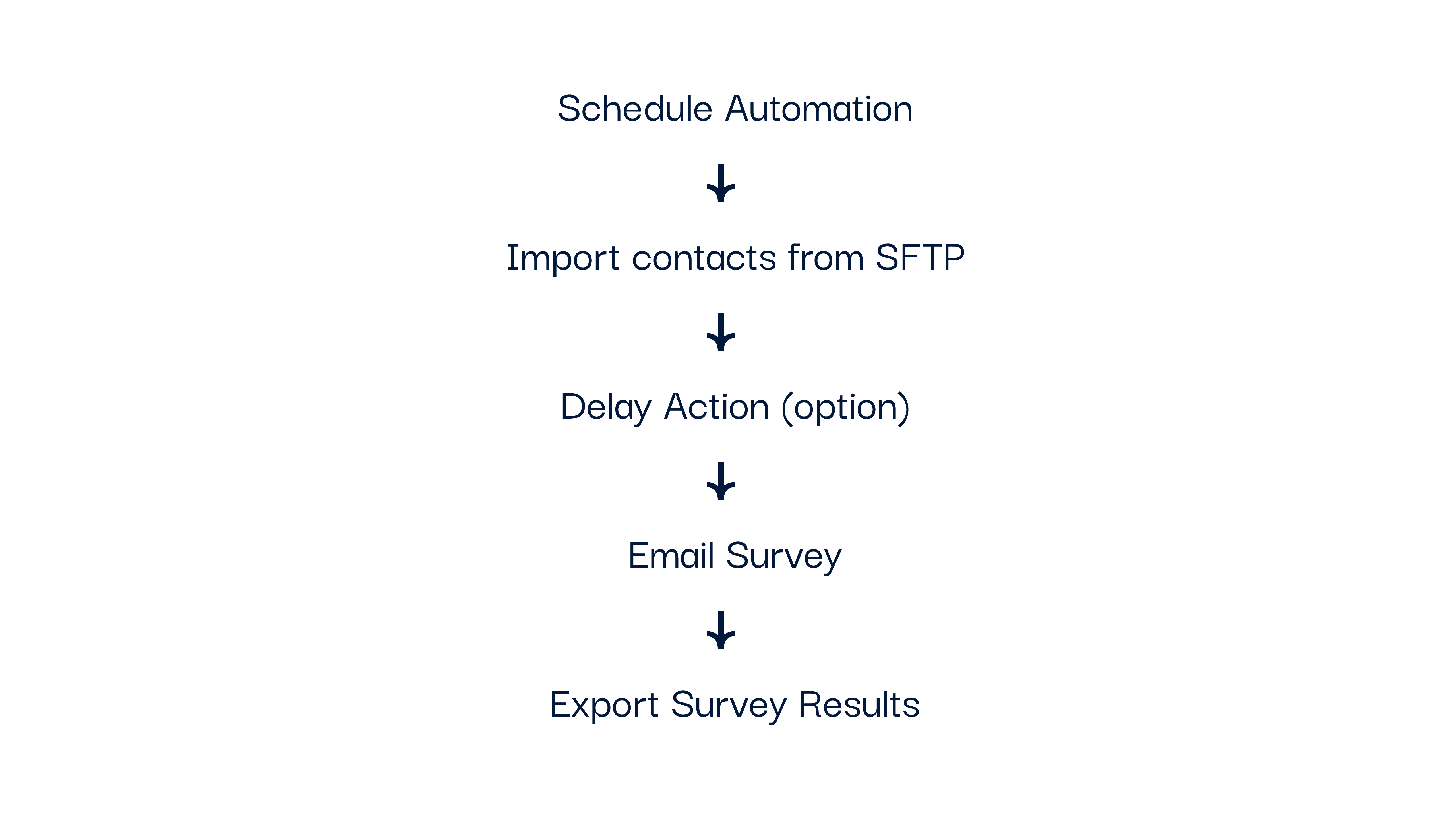
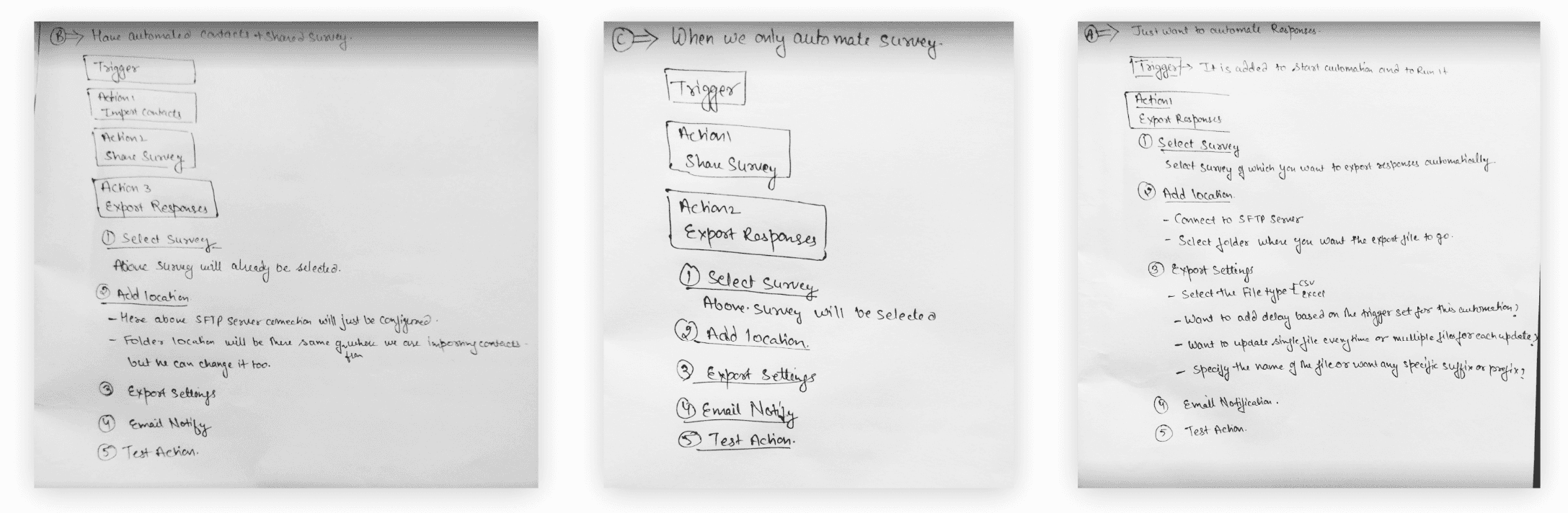
Break the flow into 5 building blocks: schedule, import, delay, distribute, export
Offer modular controls and real-time visibility.
Visualise automation flow through a step builder with error handling.
Design Approach
We broke the workflow into five modular building blocks to give users flexibility and control:
Each block was designed to work independently and in sequence, allowing users to build workflows that fit their unique use cases within a step-based interface that provided real-time feedback.
We focused on:
Clear visual flow setup.
Inline guidance and validation.
Built-in testing flow before publishing, so users could run a dry test of their automation to confirm everything works before going live.
We chose a step-based builder because it mirrors how users already think about sequencing tasks. Most users, like Arjun and Sarah, found comfort in seeing a visual breakdown instead of configuring everything in a single form. It gave them clarity and control without overwhelming them.
By making each block modular, we allowed teams to build workflows that matched their pace and needs, whether running a daily pulse check or quarterly review.
Design Execution
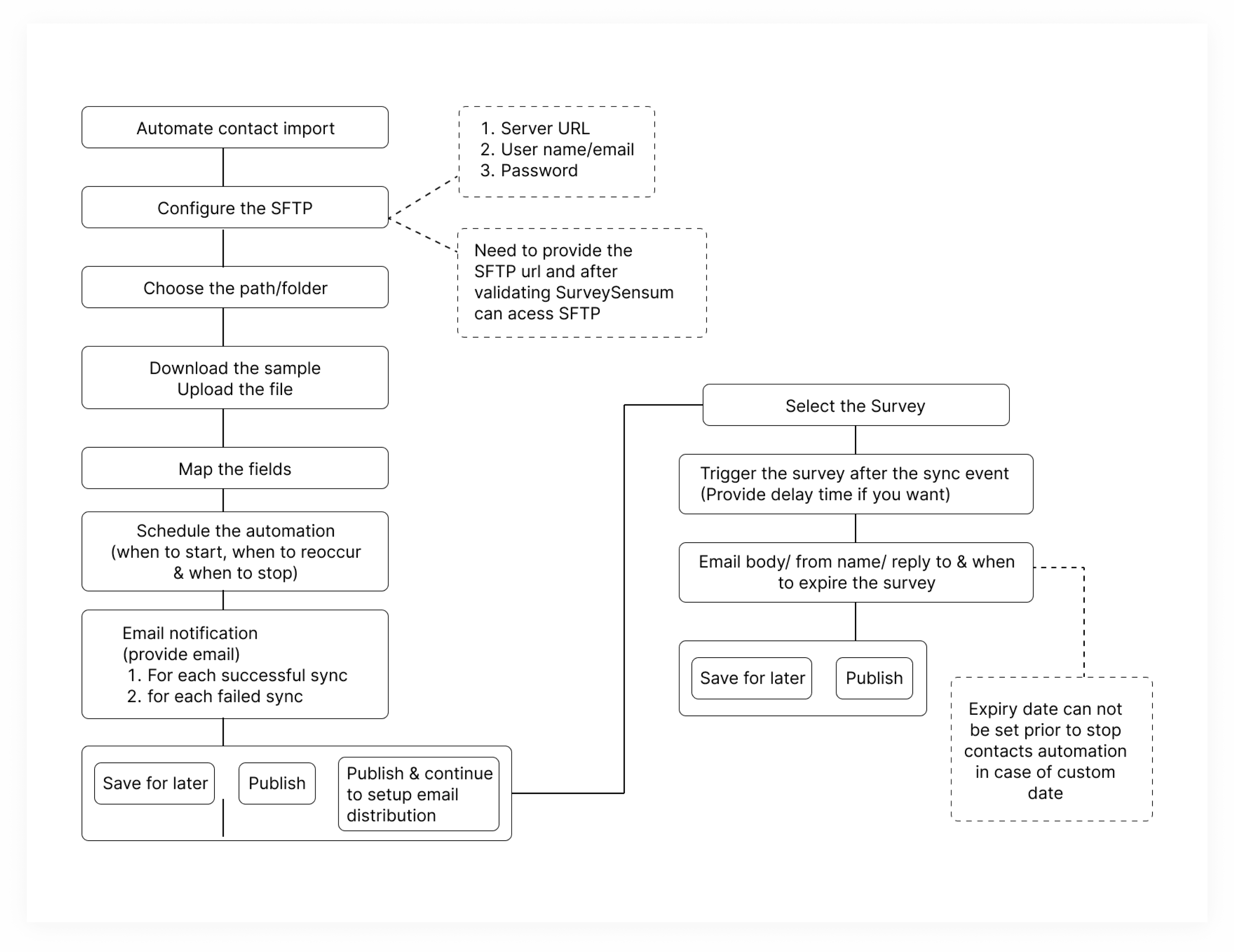
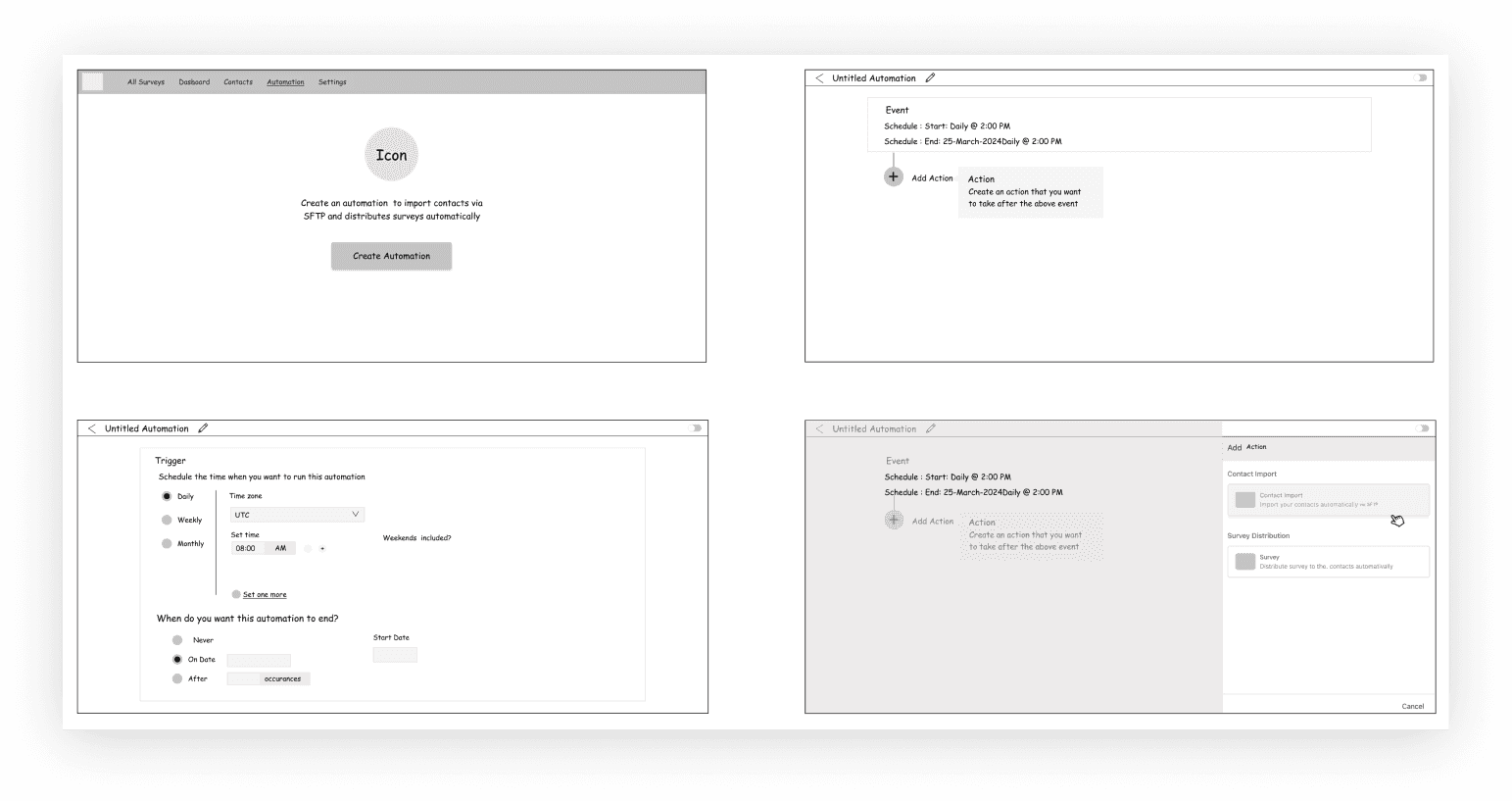
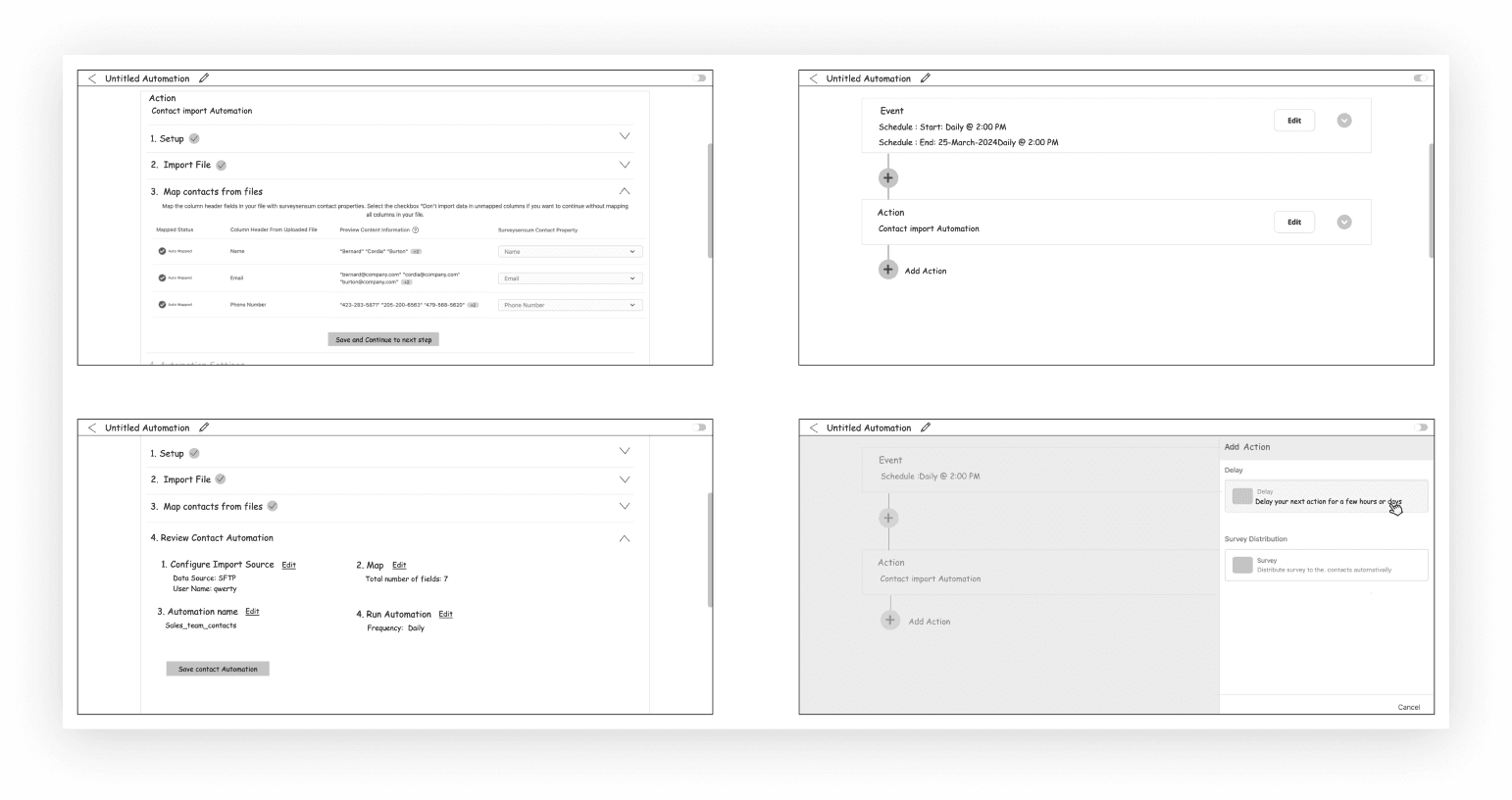
We translated the five-block flow into low-fidelity wireframes to define:
Contact import via SFTP.
Email survey scheduling with delay logic.
Automated response export setup.
These flows then informed the full interface.
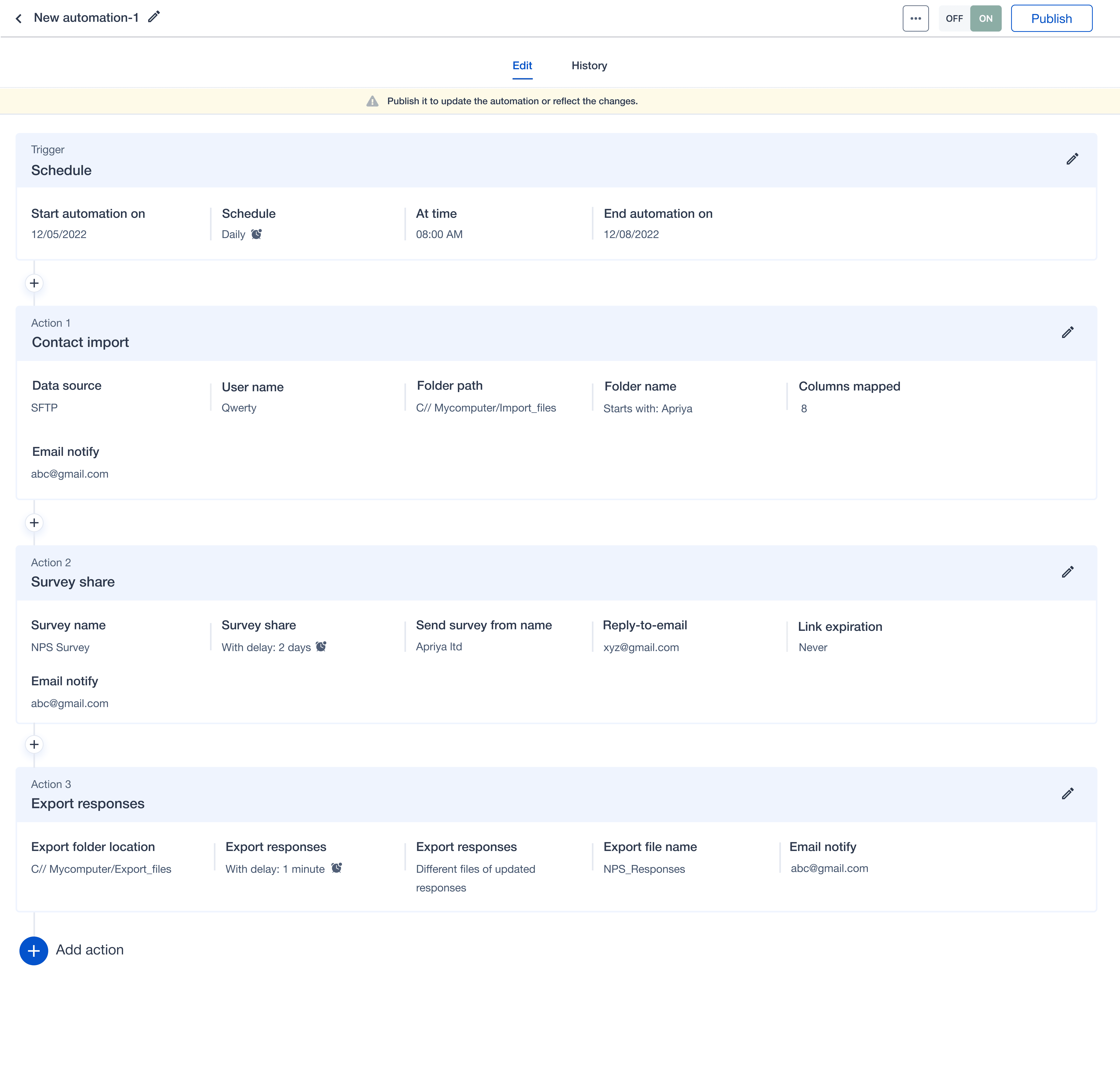
We implemented these core features:
Scheduled Triggers: Automate workflows by date, time, or frequency.
SFTP Import: Secure contact import with automatic data mapping.
Survey Distribution: Send surveys immediately or via a custom schedule.
Delay Actions: Introduce time gaps between automation steps for control.
Export Responses: Automatically send survey responses to output formats.
Usability Testing
Ran 3 iterative rounds using clickable wireframes.
Received feedback on naming, flow clarity, and error states.
Simplified language and reordered confusing steps.
Added inline tooltips and contextual help.
Final Design
The UI was built to feel lightweight, powerful, and intuitive:
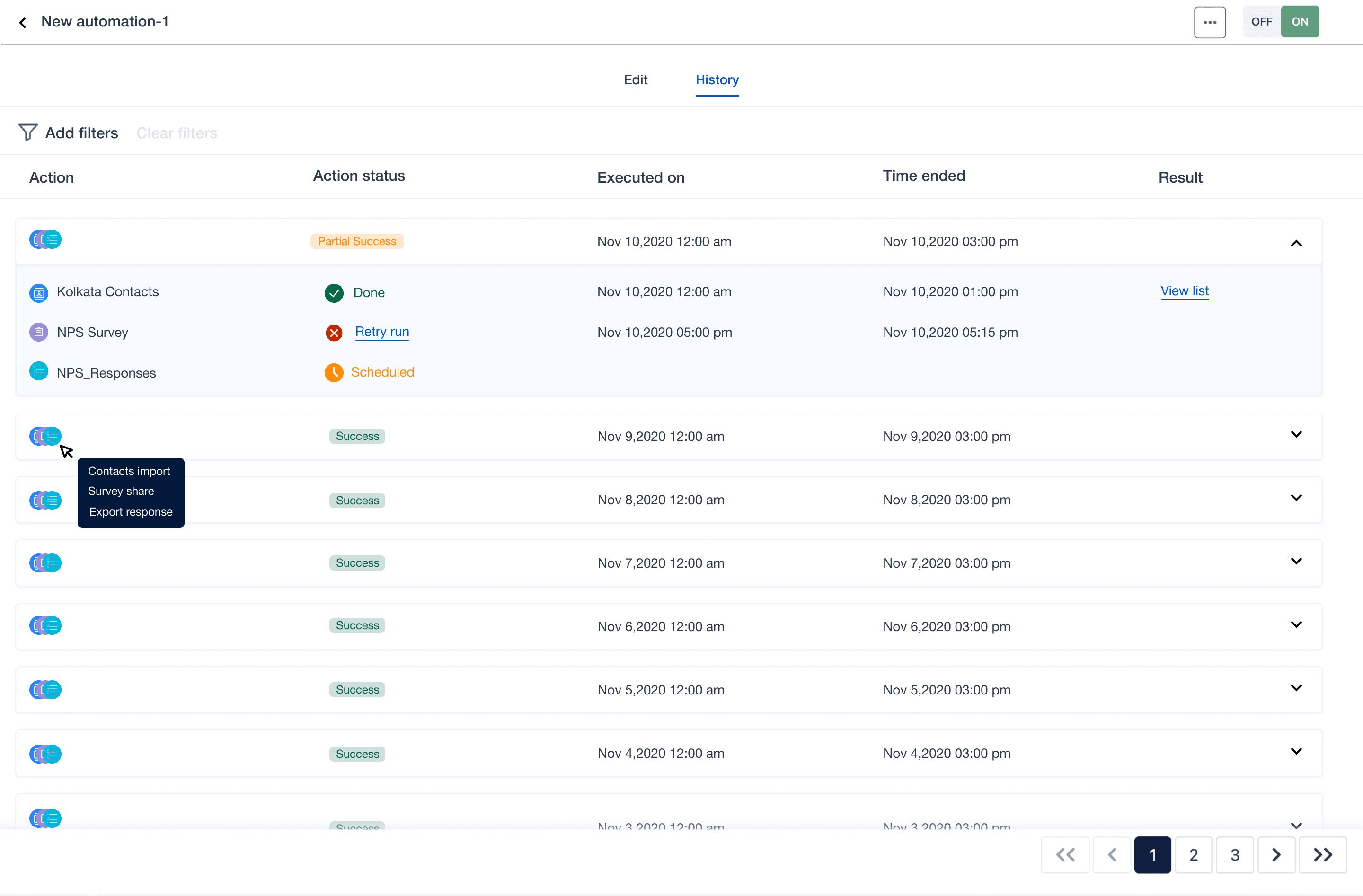
A clean dashboard summarising automation status and execution history.
Modular step-by-step builder for setting up automations.
Clear CTAs, contextual help, error states, and audit logs.
Key Metrics and Performance Indicators
% of automated survey flows activated within the first login session.
% of users who reuse automation templates monthly.
Error rate in automation tasks post-deployment.
Average time saved per user vs baseline.
Outcome & Impact
30% reduction in manual processing time.
25% improvement in internal productivity.
Helped secure major clients: Apria, Allianz, and Cred.
35% increase in revenue and 20% expansion in market share.
50% improvement in customer engagement.
15% rise in overall satisfaction scores.
Reflection
This project taught me to design for workflows, not just features.
I learned how to make complex systems feel simple.
Working independently boosted my confidence in strategic design.
I saw how deep research leads to unexpected but high-impact opportunities.
I refined my ability to collaborate across teams, even when leading solo.
Thoughtful automation isn't just about speed. It's about freeing users to focus on what matters.